This is suitable for:
- Trustees wanting to give your accountant or fellow trustees access to your contribution data Colladium
- Accountants wanting to give their trustees access to their contribution data on Colladium.
You must be a super administrator or SMSF administrator to do this.
How to give access
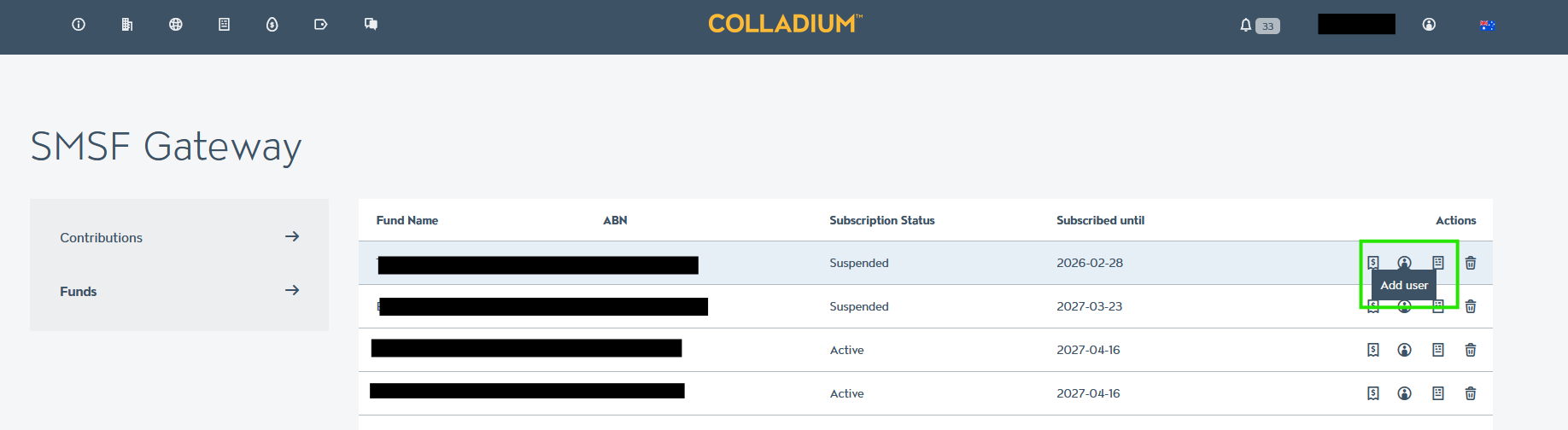
- Navigate to the SMSF Gateway funds page
- On the line with the fund you would like to invite someone to, click the ‘add user’ icon in the ‘actions’ column
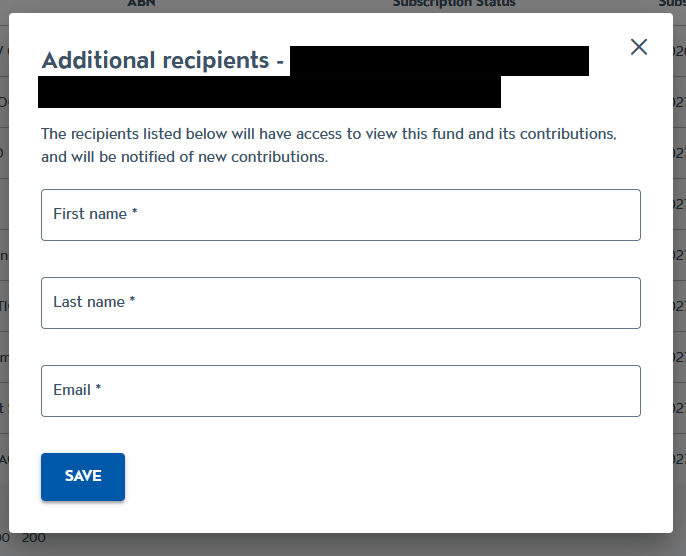
- Enter the first name, last name and email address of the person you would like to invite and click ‘save’
- The recipient will receive an email letting them know they have access to the SMSF on Colladium
- If they already have an account on Colladium, they can login and ‘switch’ to your organisation and view the SMSF
- If they don’t yet have an account on Colladium, they will be prompted to create on, then they can view the SMSF.
What can users with access to the SMSF do?
If you provide others with access to an SMSF, they can do the following:
- See the SMSF in Colladium.
- View and download contributions for that SMSF.
- Download an ESA form.
They cannot:
- See other SMSF you manage.
- Delete the fund from Colladium.
- Invite others to the SMSF.
If you would like to provide more access to your organisation, such as managing all funds, being able to remove all active funds and more, you can invite a colleague to your organisation.